Sep 24, 2026 · by Baptiste, founder of Vanpelt Studio
How to get sponsored on YouTube in 2026: the new branded content rules and the tools brands now use to find you
Part of YouTube updates for creators: official YouTube changes, explained in plain English.
Brand deals on YouTube changed a lot in 2026, and most of it happened quietly inside YouTube Studio. The old “paid promotion” checkbox became branded content, with new controls and automatic labels arriving this fall. And YouTube’s partnership tools now do more of the matchmaking: brands can find you, brief you and pay you without a single cold email.
Two official videos on YouTube’s Creator Insider channel explain it. In the first, Rene Ritchie, YouTube’s creator liaison, walks through the branded content update. In the second, he talks with Hope Scope, a creator with over 8 million subscribers, and Romana, a product manager at YouTube who works on creator partnerships and brand advertising. This article sums up both, then gives you seven steps to get sponsored on YouTube with the tools as they work now.
When you need it: you’ve never had a brand deal and don’t know where they come from. You’ve had a few, but they arrived by luck. Or you’ve heard “paid promotion” is gone and want to be sure your disclosures are still right.
For what to charge once a brand is interested, see our companion guide to YouTube sponsorship rates.
The conversation with Hope Scope and YouTube’s brand team, from the Creator Insider channel.
What changed: “paid promotion” is now “branded content”
From YouTube’s branded content update, published September 3, 2026:
- New name. YouTube Studio moved from “paid product placement” to the industry-standard term branded content.
- Age and country controls. When you answer yes in the paid promotion and brand section of a video’s details, you can now set a minimum viewer age, globally or country by country, or block the video in chosen regions. That helps with deals in categories where advertising rules differ by age or country, which used to mean turning some deals down.
- A new viewer label. A cleaner branded content label replaces the old “paid promotion” tag viewers saw on videos.
- Automatic labels, starting this fall. Disclosing paid partnerships is still your responsibility. But if YouTube’s systems detect undeclared promotion in a new video, they’ll apply the branded content label automatically.
- You can push back. If the system gets it wrong, in many cases you can go into YouTube Studio and switch the setting back to no.
- Where: YouTube Studio on the web, the Studio app, and the main YouTube app on mobile. YouTube also rewrote its help center guidelines to make them easier to follow.
Remember that YouTube’s label doesn’t replace the law. In the US, the FTC expects a clear disclosure in the video itself too. Tick the box and say it on camera.
What YouTube’s brand team said about getting deals
From the conversation with Hope Scope and Romana, published September 15, 2026:
Brand matching isn’t only about your category. YouTube runs a hub for the whole brand-deal process, the Creator Partnerships hub (you may know its earlier name, BrandConnect), and uses AI models to match creators and brands. Romana’s point was that the best match often isn’t in your niche: Hope, a fashion and lifestyle creator, worked with a finance app because its audience overlapped with hers. Ritchie had the same experience: a cooking-equipment brand sponsored his tech channel, he made a hamburger for the sponsor segment, and his audience loved it.
Two small things make you easier to match. Opt into insight sharing in Creator Partnerships, so YouTube knows more about your audience and style. And answer brand messages fast: deals are often tied to a product launch or a bigger campaign, and a slow reply can cost you the deal.
Open calls mean you don’t have to wait to be discovered. Brands publish creative briefs. You make an original video in your own style and submit it. If you’re selected, you’re paid. If you’re not, you’re on the brand’s shortlist for next time.
Brands can now find you through your own videos. With brand mentions, YouTube’s models surface videos where creators already talk about a brand. In one example, Canva used existing creator videos about Canva Pro as ads, and saw 9% more sales at 8% lower cost.
Brands are more open to your ideas. Hope noticed that scripts have gone from tightly controlled to leaving room like “share your personal experience here”, because creators know their audience.
Turn on automatic mid-rolls. Placing ad breaks by hand, or only using a pre-roll, mid-roll and post-roll, often leaves money on the table. YouTube’s automatic placement uses Gemini to find natural breaks, and an ad slot doesn’t mean viewers get an ad at every slot. Placement also differs by device: on a TV, often with several people watching, breaks are placed differently than on a phone.
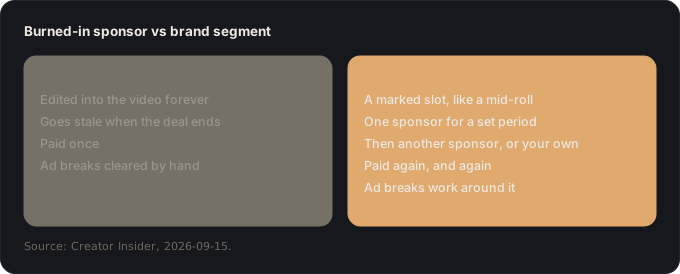
Dynamic brand segments let an old video earn from a new sponsor. Instead of editing a sponsorship into a video forever, you mark a segment like a mid-roll and insert a sponsor’s segment for a set period. When that deal ends, you swap in another brand, your own product, or an upcoming event. Hope ran one on older videos that still perform well and filmed it as “Hope from the future”, so her changing hair colour wouldn’t look odd. Automatic mid-rolls also work around the segment, so you no longer clear ad breaks out of sponsor reads by hand.
More is coming for links. YouTube announced a boost for videos with affiliate links and brand links in Shorts, meant to make videos more useful to viewers and to earn creators extra commission.
Build a mix, not a single stream. Hope started almost entirely on affiliate commissions, moved almost entirely to AdSense, and is now aiming for a mix of brand deals, AdSense and her own product (merch). Ritchie added a useful rule: topical videos spike and fade, so brand deals capture their value best, while evergreen videos keep earning AdSense for years, and brand segments now let them earn from sponsors over time too.
How to get sponsored on YouTube in 2026: seven steps
One example runs through every step. Tom runs a budget-travel channel with about 25,000 subscribers: long guides like “Lisbon for $40 a day”, published twice a month. He has never had a brand deal, and he isn’t sure anyone would want one with a channel his size.
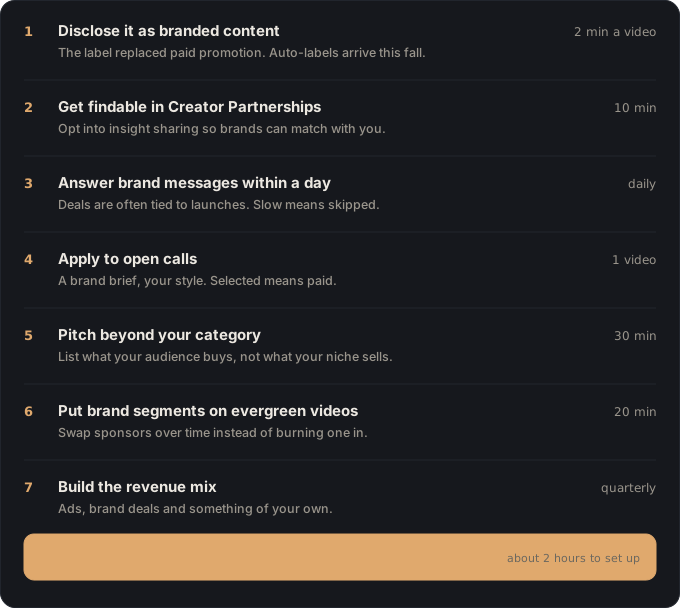
1. Disclose it as branded content (2 minutes per video)
Do this: on every sponsored video, answer yes in the paid promotion and brand section of the video details, and say it clearly on camera too. If the brand works in a category with age or country rules, set the minimum age or the blocked regions there.
You end up with: videos labelled correctly before YouTube’s automatic labels arrive.
Why: disclosure is still your responsibility, and from this fall YouTube will label undeclared promotion itself. Being labelled by a system instead of by you is a bad look for brands and viewers alike.
Tom: his first deal is with a travel insurance company. He ticks yes and says “this video is sponsored by” before the segment.
2. Get findable in Creator Partnerships (10 minutes)
Do this: in YouTube Studio, open the Creator Partnerships section, fill in your profile, and opt into insight sharing.
You end up with: a profile brands can match you with, with the data YouTube needs to do it.
Why: YouTube’s brand team said the more it knows about your audience and style, the better its matching works. Without this, brands can’t find you through YouTube at all.
Tom: he finishes his profile on a Sunday evening. Two weeks later, a luggage brand reaches out.
3. Answer brand messages within a day (5 minutes, daily)
Do this: turn on notifications for brand messages, or check them once a day, and reply within 24 hours, even if the answer is “not now, here’s why”.
You end up with: a reputation as a creator brands can work with.
Why: deals are often tied to launches and campaigns with deadlines. YouTube’s team named slow replies as a common reason creators miss out.
Tom: he answers the luggage brand the same day, with his audience’s top countries and his average engaged views.
4. Apply to open calls (one video)
Do this: browse the open calls in Creator Partnerships and pick one brief that genuinely fits your channel. Make the video in your own style, not the brand’s.
You end up with: a real chance at a paid deal, and a place on the brand’s shortlist even if you’re not picked.
Why: open calls remove the “wait to be discovered” problem, and a selected video is paid. It’s the most direct route for a smaller channel.
Tom: he answers a brief from a budget airline with “I flew their cheapest seat for 14 hours: was it worth it?”, in his usual format.
5. Pitch beyond your category (30 minutes)
Do this: write down ten things your audience buys that have nothing to do with your niche. Your comments, your community posts and your audience’s other interests will tell you. Those brands are your second list.
You end up with: twice as many possible sponsors, most of whom your competitors never contact.
Why: YouTube’s matching looks at audiences, not categories, and so should you. A finance app sponsoring a fashion creator worked because the audience fit.
Tom: his viewers are young, careful with money and often work remotely. His second list: a budgeting app, an eSIM provider, a laptop backpack brand and a language-learning app.
6. Put brand segments on your evergreen videos (20 minutes)
Do this: find your five videos that still get steady views months after publishing. Where dynamic brand segments are available to you, mark a segment in them for sponsors, and turn on automatic mid-rolls on your long videos.
You end up with: old videos that can earn from new sponsors, and ad breaks placed for you.
Why: a burned-in sponsorship earns once and goes stale. A brand segment can be sold again and again, for as long as the video gets watched, which on YouTube can be years.
Tom: his “Lisbon for $40 a day” still gets steady views every month. It’s his first brand segment, sold to the eSIM provider for three months.
7. Build your revenue mix (1 hour, every quarter)
Do this: every three months, write down how much came from ads, brand deals, affiliate links and anything of your own. Pick one part of the mix to grow next quarter.
You end up with: a business that doesn’t depend on a single stream.
Why: Hope’s advice is a mix of brand deals, AdSense and your own product. And the kind of videos you make decides which stream suits them: topical spikes suit brand deals, evergreen videos suit ads and segments.
Tom: this quarter: 70% ads, 25% deals, 5% affiliate links. Next quarter’s goal: a downloadable budget-travel planner of his own.
If it went wrong, it’s one of these
- “YouTube labelled my video as branded content, but it isn’t sponsored.” In many cases you can switch the setting back to no in YouTube Studio. Keep proof of how you got the product, in case it’s questioned.
- “No brand has contacted me.” Check step 2 first: is your Creator Partnerships profile complete and insight sharing on? Then don’t wait: apply to open calls (step 4).
- “Brands only offer me free products.” That’s a pricing conversation. Our guide to sponsorship rates shows how to calculate a fair rate from your own numbers.
- “I don’t see brand segments or some of these tools.” Features roll out gradually and can depend on your country and eligibility. Use what you have now, and keep your evergreen list ready for when they reach you.
- “My audience complains about sponsors.” Pick brands they’d actually want, give yourself creative room in the script, and be honest in the review. YouTube’s point was that trust is the whole value: break it and the deals go too.
Where Vanpelt Studio fits (if you want help)
Sponsors pay for audiences who pay attention, and a brand segment only earns if people are still watching when it plays. The Vanpelt Studio desktop app helps with that side: it imports your YouTube Studio retention data and names the moment viewers leave, so you know where a segment will actually be seen. And for your pitch, see how to report engaged views and TV co-viewing honestly.
Sources
- Creator Insider (YouTube), New! Branded Content Feature and Policy Updates, published September 3, 2026.
- Creator Insider (YouTube), Unlocking the Business of Brand Deals on YouTube, with Hope Scope, published September 15, 2026.
- FTC, Disclosures 101 for Social Media Influencers: the US legal disclosure baseline.