Sep 24, 2026 · by Baptiste, founder of Vanpelt Studio
What counts as a view on YouTube now: first-frame views, engaged views and co-viewing explained
Part of YouTube updates for creators: official YouTube changes, explained in plain English.
YouTube changed what a view is. Since August 24, 2026, a view counts the moment a video starts playing, from its very first frame, for every format: long videos, Shorts, podcasts and live streams. A week later, a second change arrived: a new private metric called views (co-viewed) that estimates how many people are watching together on a TV.
Both changes were explained by Rene Ritchie, YouTube’s creator liaison, on YouTube’s official Creator Insider channel. This article sums up what they mean for you, then gives you five things to do in YouTube Studio this week so your numbers stay honest.
When you need it: your public view counts jumped and you’re not sure if your channel grew. A sponsor asked for your numbers. Or you saw someone claim that “a view takes 30 seconds” and wondered if that was ever true.
YouTube’s own explanation of the new view count, from the Creator Insider channel (about 4 minutes).
What counts as a view on YouTube now
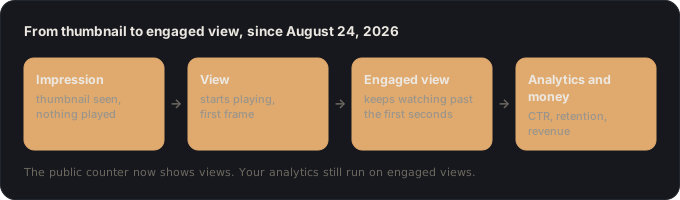
YouTube calls it an exposure-based model. It already applied to Shorts in 2025. From August 24, 2026 it covers everything. Here is how each moment is counted now:
- You see a thumbnail and do nothing. That’s an impression, not a view. Same as before.
- A video starts playing, even on its own. If you hover over a thumbnail on the homepage or in the suggested list and it starts to autoplay, that is now a view, from the first frame. The same goes for a Short that starts playing in the Shorts feed.
- It keeps playing for a few seconds. That’s an engaged view: the viewer stayed past the first frame and the first few seconds. This is how all views were counted before the change.
- You click a thumbnail and watch. That was a view before, and it’s a view and an engaged view now. Nothing changed there.
Why YouTube did it: to have one definition of a view across every format, so a Short, a podcast and a 40-minute video are counted the same way. That also makes a creator’s full reach easier to show to brands and sponsors.
The 30-second myth
A view never took 30 seconds. YouTube said so directly in the video. It doesn’t publish the exact number of seconds behind an engaged view, because it varies by surface, and because it doesn’t want creators optimizing for a threshold instead of for viewers.
What did not change
This is the part that matters most, and it’s the part people keep getting wrong:
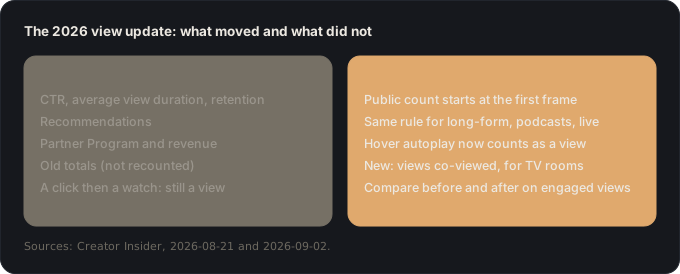
- Your analytics. Click-through rate, average view duration and retention are still based on engaged views. Your CTR didn’t move because of this.
- Recommendations. The algorithm isn’t affected. (For how recommendations do work, see our article on the YouTube algorithm in 2026.)
- Money. Engaged views are still what qualifies Shorts for ad and Premium revenue sharing, and what monetization and revenue are calculated on for every video. Partner Program eligibility still uses qualified views.
- Old totals. View counts from before August 24 are not recounted. Only new views on those videos follow the new rule.
- Clickbait. A click followed by watching was already a view. Nothing in this change rewards a misleading thumbnail.
Views co-viewed: counting the people on the couch
The second change is about the TV. YouTube says people watch over a billion hours of YouTube on TV screens every day, often with friends or family. Until now, one TV playback counted as one view, however many people were in the room.
Views (co-viewed) estimates the total number of people watching on TVs. A family of three watching together counts as three co-viewed views.
YouTube’s explanation of views co-viewed, from the Creator Insider channel (about 3 minutes).
What to know about it:
- It’s private. You see it in YouTube Analytics. Your public view count doesn’t change.
- It’s an estimate. YouTube models it from demographic patterns, the genre of the video and viewing times, to predict when people are watching together.
- It doesn’t affect money. Revenue sharing, AdSense payouts and Partner Program eligibility still run on engaged views and qualified views.
- It’s platform-backed, which means you can use it in brand deal negotiations to show your real audience on TV.
- It pairs with unique reach, a metric YouTube introduced earlier in 2026. They answer different questions:
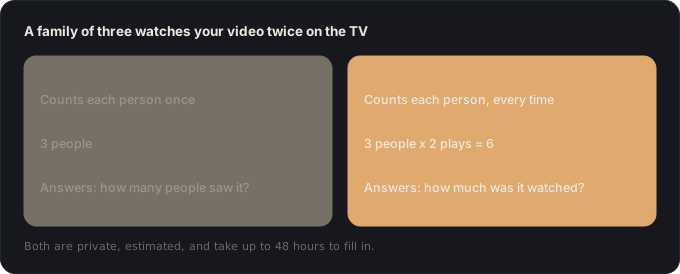
- It takes up to 48 hours to fill in. Any date range that includes the last two days, such as “last 28 days” or “this month”, will make it look lower than it is.
- Where to find it: since August 31, 2026, in the advanced mode of YouTube Analytics, next to unique reach.
What to do in YouTube Studio this week
One example runs through every step. Dana runs a board-game review channel for families, with about 12,000 subscribers and one 20-minute review a week. A board-game publisher has just asked her for her numbers before sponsoring a video. Her public view counts jumped in late August, and she isn’t sure what to tell them.
1. Compare before and after on engaged views (10 minutes)
Do this: in YouTube Studio, open Analytics, switch to advanced mode, and add the Engaged views metric. Compare your videos from before and after August 24 on engaged views, not on the public view count.
You end up with: a like-for-like table of your recent videos, where a jump means real growth and not a counting change.
Why: engaged views are counted the way all views were counted before the change, which is why YouTube recommends them for historical comparisons.
Dana: her public views went up about 15% after August 24. Her engaged views are flat. Her channel didn’t grow. The counting did.
2. Don’t celebrate or panic about the public number (2 minutes)
Do this: write a one-line note in your channel log: “August 24, 2026: public views now count from the first frame.” Look at it before you draw any conclusion from a chart that crosses that date.
You end up with: a marker that stops you from misreading your own history in six months.
Why: hover autoplay on the homepage and the suggested list now adds views that used to be ignored. That changes the public count, not how many people actually watched.
Dana: she adds the note next to the date in her spreadsheet, so the spike is explained before she sends anything to a sponsor.
3. Stop working toward a “30-second” threshold (5 minutes)
Do this: if your intros are built around getting viewers to some magic second count, drop that goal. Aim to keep the promise of your title as early as you can instead.
You end up with: one sentence at the top of your script template: “By second 10, the viewer knows they clicked the right video.”
Why: there is no fixed number of seconds, and YouTube doesn’t publish it. What your analytics measure is whether people stay, which is a matter of a hook that keeps the title’s promise, not a timer.
Dana: she cuts her 40-second channel intro and opens on the board already set up, with the question her title asks.
4. Pull your TV audience (10 minutes)
Do this: in advanced mode, add Views (co-viewed) and Unique reach. Set a custom date range that ends at least two days ago (for example, the 1st to the 17th of last month), so the 48-hour processing delay doesn’t shrink the numbers.
You end up with: for each recent video, how many people watched on a TV, not only how many screens played it.
Why: this is the first platform-backed number that counts the whole room. For family, cooking, gaming or documentary channels, it can be a big share of your real audience.
Dana: family board-game nights happen in front of the TV. Her co-viewed views come to about 1.6 times her TV views: she was undercounting her living-room audience by a lot.
5. Update your sponsor pitch, and label every number (15 minutes)
Do this: in your media kit or pitch email, report engaged views for performance, and add views (co-viewed) and unique reach for TV reach. Name each metric exactly as YouTube does, with the date range.
You end up with: a pitch that shows your full audience and that no brand can accuse of inflating anything.
Why: YouTube built co-viewed views partly so creators can show brands the full value of TV viewing. Labelling them clearly is what makes them credible. For what those numbers are worth in money, see our guide to YouTube sponsorship rates.
Dana: her pitch now reads: “Engaged views per video (last 3 months): 9,400 on average. On TV, views (co-viewed): 5,100 per video, unique reach: 3,200 (1 to 17 August).”
If it went wrong, it’s one of these
- “My views jumped but my revenue didn’t.” Expected. Revenue is calculated on engaged views, not on the first-frame count.
- “My views jumped but my CTR dropped.” The two aren’t linked: CTR is still based on engaged views. Look at your packaging and your traffic sources instead.
- “My co-viewed numbers look too low.” Check your date range. Anything that includes the last 48 hours will be missing data.
- “I can’t find views co-viewed.” It’s in advanced mode, not on the Analytics overview, and it only exists from August 31, 2026 onward.
- “Old videos didn’t get the new count.” Correct. Totals before August 24 stay as they were. Only views after that date follow the new rule.
Where Vanpelt Studio fits (if you want help)
None of this needs extra software: it’s all in YouTube Studio. Where the Vanpelt Studio desktop app can help is with what these numbers can’t tell you: it imports the retention CSV you export from YouTube Studio and names the moment viewers left, and what was on screen when they did. Engaged views tell you if people stayed. Retention tells you where they stopped, and that’s the part you can fix in your next video.
Sources
- Creator Insider (YouTube), New! Updates to Public View Counts and Engaged Views Explained, published August 21, 2026.
- Creator Insider (YouTube), New! Views (Co-Viewed) in YouTube Analytics, published September 2, 2026.