Sep 24, 2026 · by Baptiste, founder of Vanpelt Studio
The YouTube algorithm in 2026: what YouTube's own discovery lead just told creators
Part of YouTube updates for creators: official YouTube changes, explained in plain English.
On September 1, 2026, YouTube’s Creator Insider channel published a 40-minute conversation between Rene Ritchie, YouTube’s creator liaison, and Todd Beaupré, the senior director of growth and discovery. His team decides what shows up on your homepage, next to the video you’re watching, and in your notifications. They went through the questions creators ask most about “the algorithm”, one by one.
This article does two things. First, it pulls out what was actually said, with timestamps so you can check every point yourself. Then it turns that into a recipe: seven moves to succeed on YouTube in 2026, each with what to do, how long it takes and what you end up with.
When you need it: a video “flopped” in its first few hours and you’re wondering what you did wrong. Or you’re thinking about switching topics, starting a second channel, or turning off subscriber notifications because someone on the internet said it helps. Read this first.
The full conversation, from YouTube’s own Creator Insider channel (about 40 minutes). Every claim below links to the moment it was said.
What YouTube said about the algorithm in 2026
Twelve points worth knowing, in the order they came up. The links jump to the moment in the video.
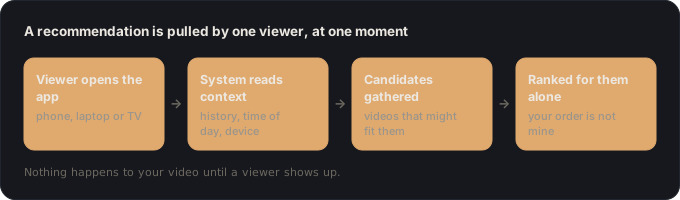
1. Your video isn’t pushed out. Each viewer pulls a ranking. Recommendations are worked out when a viewer opens the app or turns on the TV, using what the system knows about that viewer: what they’ve watched, the time of day and the device. It gathers candidate videos and ranks them for that one person, so your ranking is different from mine. Watch at 1:19.
2. Subscribers don’t “test” a video and decide its fate. Viewers with more history with your channel and topic do tend to see a new upload near the top. But Beaupré said that even in the first hour, videos reach people who have never watched the channel, and on some channels most of the audience isn’t subscribed. The system also learns separately for each audience: a video can do badly with subscribers and well with people who’ve never seen you, and each group gets the data that applies to it. Watch at 3:06.
3. The first hours are not the verdict. A lot of videos peak on day one, but a lot also get most of their views a month or more later. For evergreen content, YouTube keeps looking for viewers who might want it. Ritchie added that long videos are often saved for the TV in the evening or at the weekend, so hour-two numbers mostly show you the people who watched on their phone. Watch at 5:48.
4. People often click on the sixth or tenth showing, not the first. YouTube has experimented with capping how many times one video is recommended to the same person (a limit of eight was tested), because repeats annoy viewers. But some people only click after several showings. In one case a creator thought a viewer wasn’t seeing their uploads. The viewer had in fact been shown them 19 times and hadn’t noticed. Watch at 7:15.
5. There is no single magic metric. The north star is long-term viewer value: whether people feel good enough about YouTube to come back, for years. To estimate it, the system uses click-through rate, watch time (the minutes, and the share of the video watched), satisfaction surveys, likes, dislikes and comments. None of them is enough on its own. Surveys matter because time isn’t always value: a viewer may hang on for a payoff that never comes. Watch at 9:52.
6. The weights change by viewer, device and moment. There’s no fixed formula that is the same for everyone, or even the same for you all day. On a TV, time watched might count for more than the click. On a phone, a like or dislike is easier to give, so it may say more. Watch at 12:47.
7. Turning comments or ads off doesn’t cost you reach. YouTube deliberately built the system so that switching comments off isn’t read as “nobody is engaging”, and videos with ads off aren’t held back. Watch at 14:40.
8. “Puddles don’t cause rain.” That’s Ritchie’s phrase for mixing up cause and effect. YouTube isn’t pushing long videos. People watching on TV want them, and the system follows. Shorts took off because they remove the effort of choosing. Series work on TV because the viewer decides once and doesn’t have to pick up the remote again for hours. Watch at 16:13.
9. The bigger thumbnails on the desktop homepage helped long-form. Creators worried that fewer, larger thumbnails would mean fewer long-form views. The opposite happened: engagement with long-form went up, because too much choice makes people choose nothing. Also, hundreds of experiments run at any given time, so a homepage change you spot on social media is often a small test. Watch at 18:51.
10. New topics have their own ceiling, and one channel or two is about audience. Different subjects have different audience sizes. Ritchie’s big phone reviews reliably got hundreds of thousands of views, while his accessibility videos got a few thousand. Beaupré said aiming for your channel’s all-time high every time is unhealthy, and that a new area takes time. His advice on channels: match them to audiences. If the same people will watch both topics, keep one channel. If you’re promising something different, treat it as a separate brand. And if you pick wrong, the system copes: it recommends across channels, and within one channel it learns which topics and formats each viewer wants. Watch at 21:58.
11. Unrelated “suggested” traffic is normal, and it’s big. The list next to a video isn’t only related videos any more. It’s personalized to the viewer, who often wants to change the channel. The number one place viewers watch videos from channels they subscribe to is that suggested list, not the subscriptions feed. Watch at 28:31.
12. The subscriptions feed is your cleanest test, and 10% is normal there. Homepage ranking mostly uses how videos do on the homepage, so embeds, ads and outside links barely count toward it. Beaupré said he wouldn’t advise turning off subscriber notifications. He also pointed to one clean signal: the subscriptions feed line in your traffic sources, where the audience barely changes from video to video. Most channels see a click-through rate of about 10% or less there, even on their best videos. That’s normal, and it shows how small a slice of your audience watches everything. Watch at 33:39.
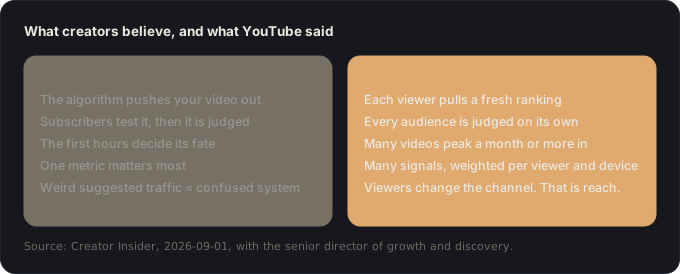
The line Beaupré closed on sums it up: focus on your audience, not the algorithm. Here’s what that looks like as work you can do this week.
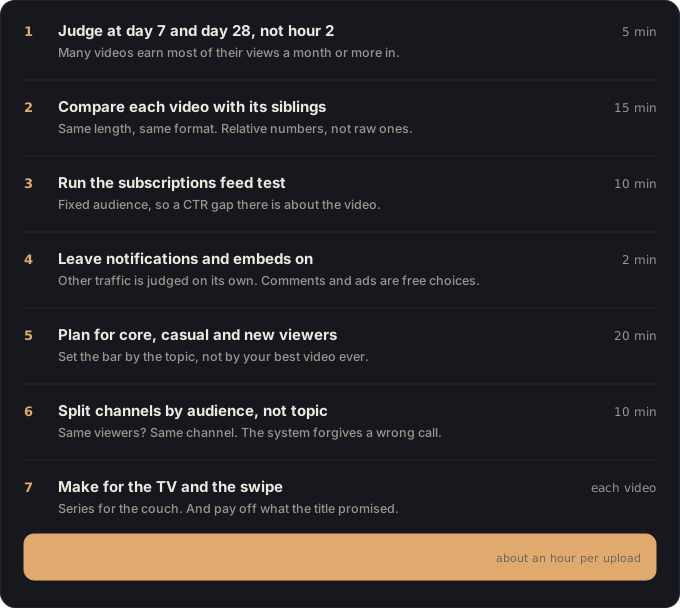
How to succeed on YouTube in 2026: seven moves
One example runs through every step. Jonah runs a weekend woodworking channel with about 4,000 subscribers. He posts one long build video a month (20 to 30 minutes) and a few Shorts from the shop. His last build looked dead two hours after upload, he’s been unticking “notify subscribers” on anything experimental, and he wants to start posting his cooking too. We’ll follow him through each move.
1. Judge a video at day 7 and day 28, not hour 2 (5 minutes)
Do this: for every upload, put two dates in your calendar: seven days after and 28 days after. Look at views and watch time only on those days. Hours one to six are for one job: making sure nothing is broken (the right thumbnail, the right link in the description).
You end up with: a two-line note per video: day 7 numbers, day 28 numbers.
Why: YouTube said many videos get most of their views a month or more in, and long videos get saved for the TV. Hour-two numbers mostly show you the phone-in-hand crowd. There’s a deeper version of this in our lesson on what the first 24 hours actually decide.
Jonah: his 24-minute workbench build had a tenth of his usual views at hour two. At day 28 it was his third-best video of the year. The early number was a timing problem, not a video problem.
2. Compare each video with its siblings (15 minutes)
Do this: in YouTube Studio, pick your last few videos of similar length and format. For each, write down the average percentage viewed, the average view duration, the like rate (likes divided by views) and where the retention graph has its biggest drop. Compare them with each other, not with some number you read online.
You end up with: a small table, one row per video, and one or two drops worth fixing.
Why: YouTube looks at relative watch time as well as the minutes, because five minutes of a two-hour video means something different from five minutes of a five-minute one. And a video that reaches a much broader audience will show a lower click-through rate and average view duration than a video shown only to fans, so raw numbers can mislead you. Our guide to reading a retention graph shows what each kind of drop means, and the post-mortem lesson turns the table into a decision.
Jonah: his three long builds all hold about 45% of the video, except one that drops hard at minute 4. That’s where he spent three minutes explaining his tool setup before the build started. That’s the fix, not the algorithm.
3. Run the subscriptions feed test (10 minutes)
Do this: in YouTube Studio, open Analytics, go to advanced mode, open the Traffic source report, expand Browse features and find the Subscriptions feed line. Compare its click-through rate and watch time across your last ten uploads.
You end up with: your uploads ranked by how well the packaging pulled the same group of people.
Why: this was Beaupré’s own tip. The audience in that feed is always your subscribers, so the targeting doesn’t change. If one video gets clicked less there, it’s about the video or its packaging, not about who it was shown to. And don’t be alarmed by the size: about 10% or less is normal, even on your best videos.
Jonah: “I ruined a $400 slab of walnut” got about 9% there. “Workbench build, part 1” got 4%. Same subscribers, so the difference is the title and the thumbnail. He now tests his titles before publishing.
4. Leave notifications and embeds on (2 minutes)
Do this: on every upload, keep “Publish to subscriptions feed and notify subscribers” ticked. Leave embedding allowed. Turn comments or ads off only if you want to for your own reasons, because neither costs you reach.
You end up with: a short upload checklist with these defaults written on it.
Why: homepage ranking mostly looks at how a video does on the homepage, so poor retention from an embed or an ad doesn’t drag it down there. Unticking notifications just stops the system from finding the subscribers who would have loved it, and YouTube judges each audience separately anyway.
Jonah: he stops unticking notifications on his experimental videos. His Shorts from the shop reach subscribers again.
5. Plan every video for core, casual and new viewers (20 minutes)
Do this: before filming, write one line: who is this video mostly for? Your core fans (they watch a lot), casual viewers (they drop in sometimes) or first-timers. Check that the title makes sense to someone who has never heard of you. Then write an honest expectation for its topic: below, around or above your usual views.
You end up with: a one-line brief per video: “for: first-timers, expect: above median” or “for: core fans, expect: below median, and that’s fine”.
Why: YouTube said the share of your audience that watches everything is tiny, your fans watch lots of other channels, and different topics have different ceilings. Measuring every video against your all-time best will make good videos feel like failures. Our lesson on serving one viewer instead of everyone goes further.
Jonah: “Five joints every beginner should learn” is for first-timers and should beat his median. “Restoring my grandfather’s hand plane” is for core fans and probably won’t. He makes both, and now he knows what to expect from each.
6. Decide one channel or two by audience, not topic (10 minutes)
Do this: for any new subject, ask one question: would the same people happily watch both? If yes, keep one channel. If the new subject promises something different to different people, give it its own channel. Write the answer and the reason down.
You end up with: a decision you won’t second-guess every week.
Why: YouTube’s advice is to think of channels like brands matched to audiences. It also said a wrong call isn’t fatal: the system recommends across channels, and within a channel it learns which topic and format each viewer wants, including long videos versus Shorts.
Jonah: his cooking videos would go to different people with different expectations, so they get their own channel. His shop Shorts stay on the woodworking channel, because it’s the same audience.
7. Make for the TV and the swipe, and pay off the promise (every video)
Do this: for your long videos, think in series: a build in three parts, a season of one project. For each video, write the payoff down before you film: the one thing the viewer gets at the end that the title promised. Then check that you actually filmed it.
You end up with: your next video planned as part of a series, with its payoff written down.
Why: TV viewers don’t want to pick a new video every ten minutes, and series let them decide once. And YouTube’s satisfaction surveys exist precisely to catch the videos people sat through waiting for a payoff that never came, so time watched alone won’t carry a video that breaks its promise. Read more on series and formats, on the title as a promise, and on endings that feed the next video.
Jonah: “Workbench build” becomes a three-part series. Part 3’s payoff is written down before he films part 1: the finished bench, loaded with his heaviest vise, and whether it wobbles.
Where Vanpelt Studio fits (if you want help)
Everything above works with YouTube Studio and a notebook. If you’d like help with the slow parts, the Vanpelt Studio desktop app covers a few of them:
- Move 2: import the retention CSV from YouTube Studio (including the file that compares you with similar videos) and it names the moment viewers left and what was on screen at that moment.
- Move 5: a channel-fit check asks whether a new idea serves the same viewer as your last few videos.
- Move 7: before you edit, it checks your footage against your plan, so you know the payoff is actually in the video while a reshoot is still easy. It also pressure-tests your title and thumbnail before you publish.
It doesn’t connect to your YouTube account and it doesn’t predict views. It helps you do the work this article describes, faster.
If it went wrong, it’s one of these
- “My video got almost no views on day one.” Wait for day 7 and day 28 before you judge it. If it’s still low then, go to move 2 and compare it with its siblings. If it’s low in the subscriptions feed too (move 3), look at the packaging first.
- “My subscribers don’t watch my new uploads.” Around 10% click-through in the subscriptions feed is normal, even for big channels. Most subscribers aren’t interested in every video, and YouTube already expects that.
- “My suggested traffic comes from completely unrelated channels.” That’s viewers changing the channel, and it’s where a lot of views come from. It doesn’t mean the system misunderstands your audience.
- “I switched topics and my views dropped.” The new topic may have a smaller audience, and both you and the viewers need time to warm up. Compare the new videos with each other, not with your old best.
- “YouTube changed the homepage and my views fell.” Hundreds of experiments run at once. Unless the change sticks for weeks, don’t rebuild your strategy around it.
- “My channel is brand new, so nobody has history with it.” YouTube matches new channels using what viewers are into and what your video is about. Its team tracks how many videos get a chance to be seen. Make the topic and the viewer obvious in the title and the first 30 seconds, and keep publishing.
The whole recipe on one line
Judge at day 7 and 28 → compare with siblings → test packaging in the subscriptions feed → leave the defaults on → plan for core, casual and new viewers → split channels by audience → make series, and pay off the promise. Or in YouTube’s words: focus on your audience, not the algorithm.
Sources
- Creator Insider (YouTube), YouTube Algorithm 2026: What Creators Need to Know, published September 1, 2026. Conversation between Rene Ritchie (creator liaison) and Todd Beaupré (senior director of growth and discovery).