Retention & pacing · Lesson 5
Endings that feed the next video
The last minute decides whether a finished viewer becomes a session, a subscriber, or a closed tab, how to land the payoff, skip the outro graveyard, and hand off to the next video.
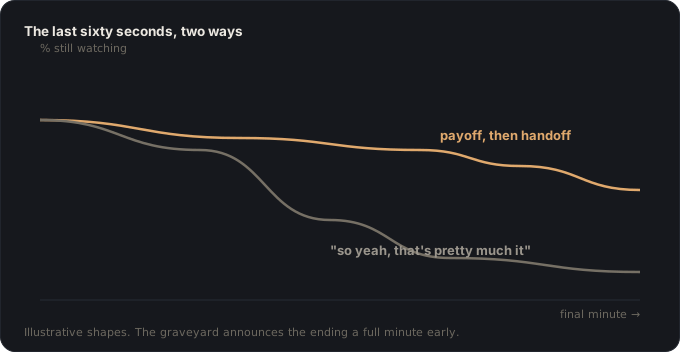
Watch where your retention curve goes in the final sixty seconds of almost any video: off a cliff. Some of that is honest: the payoff landed, the contract is complete, people leave satisfied. But a big share of it is self-inflicted, because most endings announce themselves a full minute early. The moment you say “so yeah, that’s pretty much it,” every viewer hears you may go now, and the last minute: the one place you can convert a satisfied viewer into a second view or a subscriber, plays to an emptying room.
The ending’s three jobs, in order
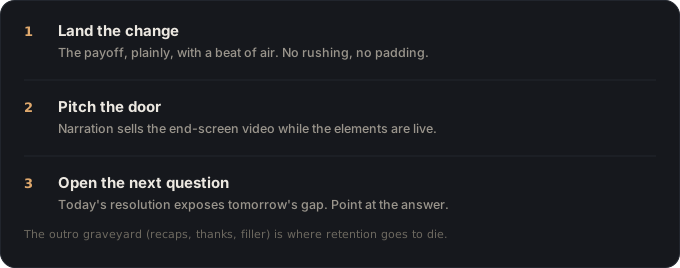
The ending isn’t an outro. It’s the highest-leverage sixty seconds of channel growth you own, and it has three jobs, in strict order.
Job 1: land the change, cleanly
First, the story work: the change this video promised gets its moment, the verdict said plainly, the before/after shown, the belief revised on camera. Don’t rush it; this is what the whole watch was for, and an ending that mumbles its payoff retroactively cheapens everything before it. But don’t pad it either: land it, let it breathe for a beat, and move, because the instant the payoff is complete, the clock on Job 3 is running.
What dies here: the outro graveyard. Recaps of what the viewer just watched, thank-yous, “let me know in the comments,” apology-adjacent filler. Every second of it is informationally silent, and silence is an exit cue. The graveyard doesn’t just lose those seconds. It buries Job 3 under them, where nobody’s left to see it.
Job 2: make the machinery worth clicking
YouTube gives every video a built-in handoff mechanism:
End screens can be added to the last 5-20 seconds of a video, with up to four elements promoting other videos, playlists, or a subscribe button.
YouTube Help, “Add end screens to videos”
The machinery is free; what it can’t do is generate a reason. An end screen over a narrator saying goodbye is a door in an empty room. The pattern that works: while the end-screen elements are live, the narrator is still delivering value, specifically, the pitch for what’s behind the door. “The tool that failed today is the one I tested against its rivals right here” beats “check out this video” the way a promise beats a description, and it’s the same skill: one sentence, specific outcome, felt stakes.
Design for it in the shoot: keep the final 20 seconds visually simple. You talking, wide shot, no critical action in the corners where elements land. The end screen is part of the video’s blocking, not a sticker applied afterward.
Job 3: open the next question
The strongest possible ending does to your channel what a planted setup does to a video: it opens a debt the next piece pays. Today’s resolution, honestly examined, almost always exposes tomorrow’s question: the fix that revealed a deeper problem, the test that only covered the cheap options, the “but that assumes the winter doesn’t get worse.” Say that, and the handoff stops being marketing and becomes the story continuing: the viewer clicks the end screen not as a favor to you but because the gap is already open and the next video closes it.
Do this honestly: the same contract as everything else: only open questions you genuinely intend to pay off, and if the next video exists, point the end screen straight at it. A channel whose endings chain this way turns single views into sessions, and sessions are where subscribers actually come from: not from being asked, but from wanting the next answer.
The ending check
- The promised change lands on screen, plainly, before anything else happens.
- Zero graveyard: no recap, no filler between payoff and handoff.
- The final 20 seconds are blocked for end-screen elements, and the narration pitches what’s behind the door.
- The ending opens a real next question, and the end screen points at the video that answers it.
- Nothing is promised that the channel doesn’t intend to pay off.
🎬 Video script
- Open on the final-minute cliff of a real curve, then the same channel after fixing the ending: “Same videos. Different last sixty seconds.”
- Anatomy of the graveyard: play a montage of outro filler while the retention line falls in overlay.
- Show the three jobs in order on one real ending: payoff, live-pitch handoff, next question opened.
- Put YouTube’s end-screen mechanics on screen; then the blocking tip: shoot your last 20 seconds knowing the doors are coming.
- Close: “Land the change, skip the goodbye, open the next gap. Endings aren’t exits. They’re the next video’s hook.”
Sources
- YouTube Help, Add end screens to videos: the last-5-20-seconds mechanics and element options.
- YouTube Help, Measure key moments for audience retention: reading the final-minute cliff and what an improved ending changes.
Key takeaways
- The outro graveyard ("thanks for watching…") is where retention goes to die, land the payoff, then hand off immediately.
- End screens work when the video's last 20 seconds still have a job; give the viewer a reason, not just a button.
- The strongest ending opens the next video's question, the channel-level version of a planted setup.