Jul 1, 2026 · by Baptiste, founder of Vanpelt Studio
How to write a beat sheet for a YouTube video (with template)
You shoot for a long-form video the way most solo creators do: point the camera at the day, capture more than you’ll need, and figure out the story once you’re staring at the timeline. Then the edit starts, and it isn’t editing. It’s archaeology. Six or eight hours of footage, half of it redundant, none of it labeled by what it’s for, and you’re scrubbing through clip after clip trying to reconstruct a story that should have existed before you ever pressed record. Some of it works. A lot of it doesn’t quite connect, and you can’t tell if that’s because the footage is missing or because you just haven’t found the cut yet. Either way, you’re guessing, and guessing is slow.
The fix isn’t a better editing process. It’s a one-page beat sheet, written before the shoot, that tells you what the video actually needs, so the footage you capture already has a job.
What a beat sheet is (and what it isn’t)
A beat sheet is a short, ordered list of the moments a video needs in order to work. Each line names one moment: smaller than a scene, more specific than a topic. Each beat is one line: a single thing that has to happen on screen for the video to land. A beat sheet for a ten-minute video might have seven or eight lines total.
How a beat sheet differs from a script or a topic outline
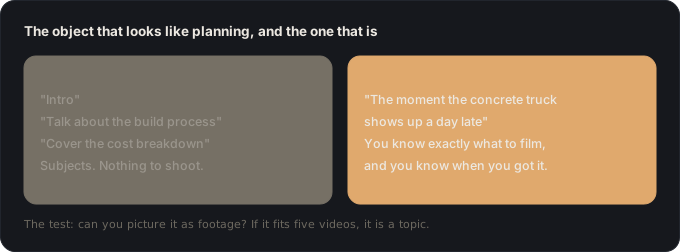
That’s a different object from the two things people usually reach for instead. A full script writes out the words you’ll say: every sentence, in order, ready to read. A topic outline lists the subjects you plan to cover: “intro,” “the problem,” “how I fixed it,” “results.” Both feel like planning, and neither one is. A script locks you into phrasing before you know what the footage actually gave you. A topic outline tells you what to talk about without ever forcing you to picture what the viewer sees. You can write a perfectly organized topic outline for a video that has no hook, no stakes, and no payoff, because “cover the subjects in order” and “make something worth watching” are not the same task.
The test: can you picture it as footage?
The test for whether a line belongs on a beat sheet: can you picture it as footage? “Talk about the budget” isn’t a beat. You can’t shoot “talk about the budget.” “The moment I add up the receipts and realize I’m $400 over” is a beat. If you can’t see the shot, you haven’t written a beat yet: you’ve written a topic, and topics are how beat sheets quietly turn into vague, structureless footage lists.
Topic outline versus beat sheet, side by side
Why long-form YouTube needs one
Retention charts fall off a cliff at structural seams, not at bad cuts or rough zooms: the moment a video promises something in the thumbnail and title and then never delivers it, or the ten-minute stretch in the middle where nothing is at stake and the viewer’s attention just drifts. Those are planning failures, not editing failures, and no amount of editing skill fixes a hole that was never going to be filled because nobody shot for it.
Why an 8-to-30-minute video can’t survive on energy alone
The deeper problem is scale. A short can survive on pure energy: cut fast, keep the hook loud, fifteen seconds of goodwill covers a lot of sins. An 8-to-30-minute video can’t. That’s too long to hold together in your head on shoot day while you’re also managing gear, light, and whatever’s actually happening in front of you. You need something outside your head that says: here’s what this video is, here’s the order it happens in, here’s what you still need to get before you can call it done. That’s what the beat sheet is for. It’s not a creative constraint. It’s memory you don’t have to carry.
The 7-beat skeleton
Most long-form YouTube videos that hold attention front-to-back are built on some version of the same seven beats. You don’t need all seven to be elaborate (some are a single shot) but skipping one usually shows up as a specific, nameable soft spot in the retention graph.
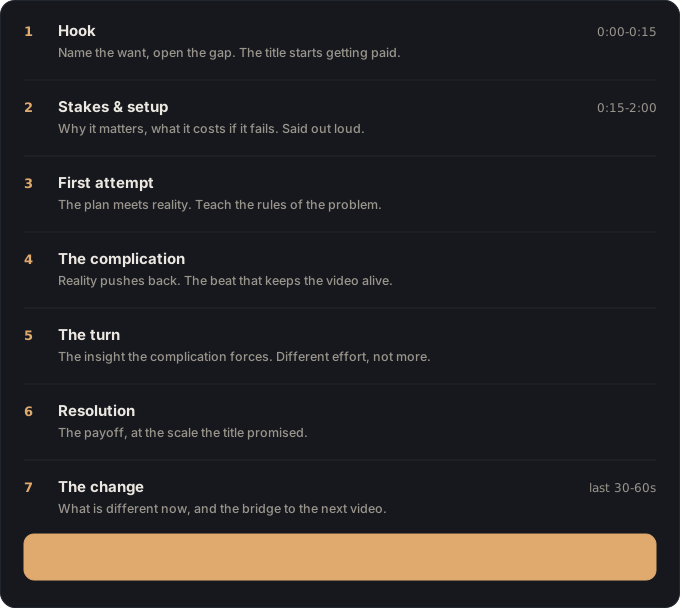
Hook. The first few seconds: the moment that earns permission to keep watching. On camera, it’s usually the payoff shown early, out of order, or a stakes-loaded question dropped cold with no preamble. Skip it, or open on setup, and most viewers are gone before the video gets a fair chance. If you’re still working out what makes a hook actually hold attention, a good primer on hooks covers the mechanics in more depth than a single beat can.
Promise and stakes: what you’re offering, and what’s at risk
Promise. Right after the hook, you tell the viewer what this video delivers: the trade you’re offering for their next ten minutes. On camera: a direct line to lens, or a title card, stating the outcome plainly. No hedging. Without it, the viewer the hook pulled in has no reason to commit past it: curiosity fades fast once that opening jolt wears off.
Stakes. What happens if this fails, or why it matters that it works. On camera: the constraint that makes the outcome uncertain, a deadline, a budget, a skill you don’t have yet, a real chance of failure. Cut it and the video plays like a demo reel: competent, easy to click away from, because nothing in it is actually in question.
Progress and the turn: concrete change, then the setback
Progress. The middle, but not “the middle” as a vague blob. Progress is 2 to 4 concrete moments where something visibly changes: a decision gets made, an obstacle gets solved, the thing gets measurably closer to done. On camera, that’s a specific shot: the second coat of stain going on, the wiring finally routed through the wall, not a generic time-lapse standing in for “and then I did more work.” Thin progress is where mid-video drop-off usually lives: the viewer can feel that nothing is actually developing, even if they couldn’t name why.
Turn. The setback, surprise, or reveal that changes the plan. On camera: the moment things stop going the way the video implied they would, a failure, a discovery, a plan revision caught live. Leave it out and the video reads as a straight line from start to finish: rarely how the project went, and never how a satisfying one feels.
Payoff and the CTA: deliver the promise, then ask once
Payoff. The promise from beat two, delivered on screen. On camera: the result, shown, not just described, the thing working, finished, or answered. A payoff only described in voiceover, or that happens off-screen, reads as a broken promise no matter how well the first six beats worked.
CTA. The one next thing you want from the viewer. On camera: a specific, single ask, said once, not a list of five things to do. Skip it and you’ve earned a viewer’s full attention for ten minutes, then given them nowhere specific to put it: the easiest subscriber gain in the video, left on the table.
Beats aren’t script. They’re the shape you’re filming toward, and it’s worth seeing what that shape looks like across different genres before you assume yours is unusual; the gallery of worked examples is a faster way to calibrate than staring at a blank page.
A worked example
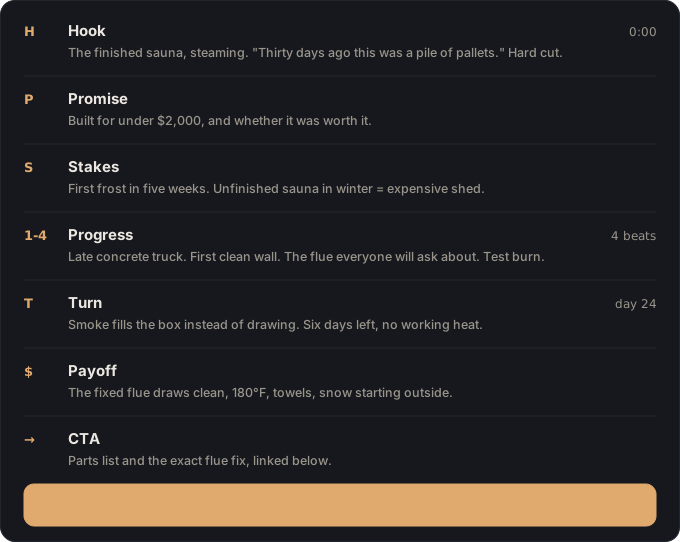
Take a real premise: “I built a sauna in my backyard in 30 days.” Here’s the whole video as seven lines, written before a single board was cut.
Hook: The finished sauna, steaming, at minute zero, then “thirty days ago this was a pile of pallets,” and we cut hard to the pallets.
Promise: “By the end of this, I’ll show you exactly how I built this for under $2,000, and whether it was worth it.”
Stakes: A shot of the calendar and the weather app, first frost is in five weeks, and an unfinished sauna in winter is just an expensive shed.
Progress:
- The foundation pour, and the moment the concrete truck shows up a day late.
- Framing the walls: the first wall that goes up clean, on camera, at normal speed, because it’s satisfying and it’s proof of momentum.
- Running the wood stove flue through the roof: the part everyone in the comments will ask about.
- Loading the stove for the first-ever test burn, before the interior is even finished.
The turn, the payoff and the CTA, in the sauna example
Turn: The stove test, smoke fills the box instead of drawing up the flue, and it’s day 24 with six days of build left and no working heat source.
Payoff: The fixed flue draws clean, the stove holds 180°F, and the two of us sit inside in towels while snow starts outside the window.
CTA: “If you want the full parts list and the exact flue fix, it’s linked below, go build one before the cold gets there first.”
What the beat sheet leaves out, on purpose
Notice what’s absent: no beat says “talk about sourcing the cedar” or “cover the cost breakdown.” Those are real parts of the video, but they live inside beats: the cost breakdown is dialogue over the progress shots, not a beat of its own, because nothing changes and nothing is at risk in “here’s what things cost.” That’s the discipline a beat sheet forces: everything earns its place by being a moment, not a subject.
The template
Copy this before your next shoot. Fill it in by hand or in a notes app: the whole thing should take fifteen minutes, and if it’s taking longer, you’re probably writing script instead of beats.
VIDEO: <working title>
PROMISE (what the title/thumbnail sells): ...

1. HOOK: the moment that earns the next 30 seconds:
2. PROMISE: say what this video delivers:
3. STAKES: why it matters / what happens if it fails:
4. PROGRESS: the middle, as 2-4 concrete moments (not topics):
 -
 -
5. TURN: the setback, surprise, or reveal that changes the plan:
6. PAYOFF: the promise, delivered on screen:
7. CTA: the one next thing you want from the viewer:
Keep the PROMISE line honest. If the promise you write here doesn’t match what your thumbnail and title actually claim, fix one of them now. That mismatch is the single most common reason a video’s retention chart falls off a cliff a few minutes in.
Four mistakes that kill beat sheets
Too many beats. A beat sheet with more than ten lines has stopped being a beat sheet. It’s a script wearing a beat sheet’s clothes. The whole value of the format is that it’s short enough to hold in your head on shoot day. Past ten beats, you’re back to needing external memory for the external memory, and you’ve lost the thing that made it useful.
Beats that are topics, not moments. This is the most common failure, and it’s subtle because a topic feels like planning. “Talk about the build process” looks like it belongs on a beat sheet. It doesn’t, because it doesn’t tell you what to point the camera at. “The moment the roof beam doesn’t fit and I have to re-cut it on the spot” does. You know exactly what you’re shooting, and you’ll recognize it the second it happens. If a beat could apply to five different videos on the same general subject, it’s a topic. Rewrite it until it could only be describing this video.
No stakes, or writing the script before the beats
No stakes beat. A lot of solo-creator videos are competent, well-shot, and informative, and they still underperform, because nothing in them is at risk. Information alone doesn’t hold attention for ten minutes: a chance of failure does. If your beat sheet doesn’t have a line that answers “what happens if this doesn’t work,” the video will feel flat even if every individual beat is well executed.
Writing the script first. It’s tempting to just start writing what you’ll say, then go back and label the sections as beats afterward. This produces the appearance of a beat sheet without the function of one, because by the time you’re extracting beats from a finished script, you’ve already made every structural decision in prose, where it’s hard to see gaps. Write the beats first, as bare moments, before a single line of narration exists. The script comes after, once you know the shape is right.
What changes on shoot day (and in the edit)
Once the beat sheet exists, the shot list mostly writes itself: each beat implies the shots that would capture it, so instead of guessing what to point the camera at, you’re working down a short, specific checklist. On the card afterward, every clip has a home: this take belongs to the turn, that one belongs to progress-shot-three, and anything that doesn’t map to a beat is either b-roll or a cut. The edit stops being a search for the story and becomes assembly of a story you already know.
Same hole, three prices, and where this workflow leads
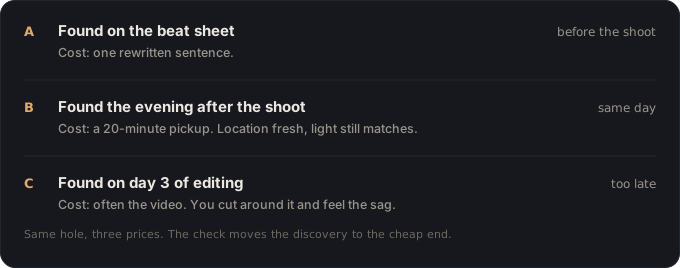
This is the workflow Vanpelt Studio is built around. It holds your beat sheet next to your footage and checks, beat by beat, that what you shot still adds up to the video you planned. Before you open the editor, run the pre-edit story check.