Sep 24, 2026 · by Baptiste, founder of Vanpelt Studio
How to change your YouTube niche: YouTube's own advice on pivoting a channel
Part of YouTube updates for creators: official YouTube changes, explained in plain English.
Every creator gets told to pick a topic they could make a hundred videos about. Then video 103 comes around and the topic doesn’t feel like yours any more. Or it still does, but the audience has moved on. Either way, you’re facing the same question: can you change your YouTube niche without throwing away the channel you built?
On September 18, 2026, YouTube’s Creator Insider channel published a conversation about exactly that, between Rene Ritchie, YouTube’s creator liaison, and Kyle, who leads content strategy at YouTube. His team watches creators all day to work out what works and turn it into playbooks. This article sums up their advice, then turns it into a seven-step plan for changing niche on YouTube.
When you need it: you’ve lost the spark for your topic, or you’re burned out on it. The game that made your channel is fading. You’ve aged out of the audience you started with. Or you have a new idea and can’t decide between your main channel and a new one.
The full conversation on pivoting, from YouTube’s Creator Insider channel.
What YouTube’s content strategy team said about pivoting
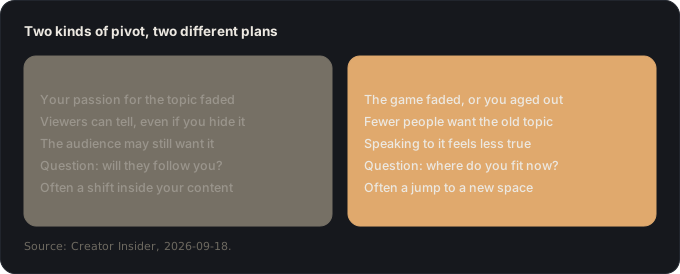
There are two kinds of pivot. In the first, you changed: you’re no longer passionate about the topic, and however hard you try to hide it, your audience can tell. In the second, your audience moved on: the game that made you famous faded, or you’ve aged out of the topic (Kyle’s example is creators who made back-to-school videos, then graduated). Kyle treats them as two different paths, and the first job is knowing which one you’re on.
Don’t react on the day. Plan first. Kyle sees a knee-jerk urge in creators to make something completely new right away. His advice is to step back, work out which path you’re on and what the end goal is, and only then decide how big a jump to make. YouTube also has a creator resource called Pivoting your content that maps these paths out.
Don’t “full send”. A pivot doesn’t have to start with an entirely new video. You can tease the new direction into your scripts, your concepts and your thumbnails, which is easier on you (you don’t have to learn a whole new space overnight) and easier on your audience (they can drift over with you).
Work out what your audience is actually there for. Ritchie called this one of the hardest parts of his own pivot. Some viewers would watch you paint a fence. Others are there for the topic and will find it elsewhere if you stop. And often it’s neither: they come for your vibe, the comedy or the analysis or the tone you bring to everything. That voice can travel to a new topic even when the topic can’t.
Shelf life matters. Ritchie shared his own mistake. He followed the classic advice (20% new topic, then 50%, then 80%, then all of it), but his videos were short-lived news. His existing audience didn’t engage with the new topic, and by the time YouTube’s discovery system had found the right viewers, a week or two later, they had already watched the same story from the creators they usually watch. Evergreen videos would have given the pivot more time to land.
Respect the space you’re moving into. Don’t expect your old numbers on day one. Learn what makes the new space what it is (its look, its terms, its formats) before you mix your style into it. Blending two worlds works, Kyle said, the way fusion food works, but only once you know the rules you’re bending.
Size the destination honestly. Every topic has its own potential audience (Ritchie suggests checking Google Trends), and you also have to weigh how well you’ll execute in it and how much competition is already there: nine big creators chasing the same viewers is not the same as three. Kyle’s advice is not to chase the biggest topic but the one that’s attainable, real to you and less crowded, unless you have a genuinely new angle. A small share of a smaller space can still be a lot of people.
Decide what success means. If you want the most views and subscribers, you’ll need to go broad. If you want revenue, plenty of narrow, deep channels earn far more than channels with ten times the views, through memberships and a loyal community. And some creators simply have something to say. Each goal points to a different pivot.
Test on your current channel first. In most cases, both agreed, it makes sense to try the new direction on your main channel: you already have an audience, you’ll get more data faster, and you still need to keep publishing to support yourself or your team. If the audience comes with you, great. If there’s a fundamental mismatch, test a separate channel. And if the new direction takes off, you can always spin it into its own channel later. Exceptions exist, such as a faceless channel or a deliberate fresh start.
Announcing a new channel is a judgment call. If the new content is for the same people and you’re proud of it, tell them. If it’s a vast departure, you may prefer to build a new audience without the old expectations. Either way, YouTube’s discovery system notices when viewers of one channel start watching another and builds a path between them.
Be ready to build in public. Announce a pivot and you may get a surge of goodwill, then numbers that look like a new channel’s, plus comments saying you “fell off”. Kyle has watched creators abandon good pivots because of that backlash. Prepare for it, take the useful feedback and keep going.
Give yourself grace, and give it time. A pivot isn’t the algorithm putting you in a box. Different topics simply have different potential, and even with your existing audience you’re starting from “zero plus one”. Don’t judge a new direction on its first three videos, or even its first ten. Set success metrics and a timeline, think like a viewer (how would you feel if your favorite channel did this?), and keep people around you who will tell you honestly when something isn’t working.
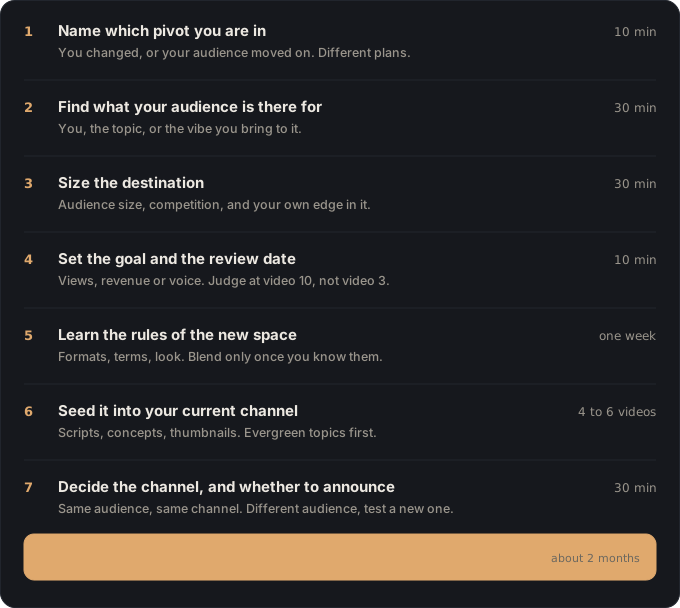
How to change your YouTube niche: a seven-step plan
One example runs through every step. Marco is 27 and runs a Fortnite channel with about 30,000 subscribers. He started it at 19. His views have been sliding for a year, and what he really wants to talk about now is how games are designed: why some levels feel great and others don’t.
1. Name which pivot you’re in (10 minutes)
Do this: write one sentence that starts either “I changed:” or “My audience moved on:”. If both are true, write both, and put the stronger one first.
You end up with: the sentence that decides how big a jump you need.
Why: a pivot because you changed can often happen inside your content. A pivot because the audience left usually means moving to a new space. Starting with the wrong one wastes months.
Marco: “My audience moved on: Fortnite is a smaller share of what my viewers play. I changed: I’m more interested in why games work than in winning them.” Both are true. The second one is stronger.
2. Find what your audience is actually there for (30 minutes)
Do this: read the comments on your ten most-watched videos and your ten most recent. Sort each comment into one of three piles: you (“love your energy”), the topic (“best Fortnite tips”) or the vibe (“your breakdowns are the best”). Then look at any off-topic video you’ve made and how it did compared with your usual.
You end up with: a line like “they come for: my analysis first, the game second”.
Why: if they come for you or your vibe, a lot of them can follow you to a new topic. If they come for the topic, expect to rebuild more of your audience. Our lesson on the video only you can make helps you name that vibe.
Marco: most comments praise his “breakdowns”, the way he explains why a play worked. That’s a vibe, not a game, and it’s exactly what game design needs.
3. Size the destination (30 minutes)
Do this: for the new topic, write three lines. Size: how many people want it (Google Trends, search suggestions, the view counts on the biggest videos in the space). Competition: how many strong channels already cover it, and how. Your edge: what you’d bring that none of them do.
You end up with: a three-line scorecard, and an honest idea of what’s attainable.
Why: YouTube’s advice is to chase what’s attainable and uncrowded, not the biggest space. Our guide to finding YouTube video ideas people already want shows how to collect this evidence in an evening.
Marco: game design is a smaller space than Fortnite, with a handful of big essay channels. None of them explain design through the eyes of a competitive player. That’s his edge.
4. Set the goal and the review date (10 minutes)
Do this: pick your main goal: views, revenue or voice. Then put a review date in your calendar that’s at least ten videos away, and write down what “working” means by then.
You end up with: one goal, one date, one definition of success.
Why: YouTube gives you feedback within minutes, and that’s what makes pivots so hard to stick with. Kyle’s advice is to have success metrics but not to judge the new direction on its first video, or its tenth.
Marco: goal: a smaller but loyal audience that would pay for memberships. Review after video 10: “At least half of the returning viewers on the design videos.”
5. Learn the rules of the new space (one week)
Do this: watch the ten biggest videos in the new space as a student. Note the formats they use, the words the audience uses, the look of the thumbnails and the length of the videos. Only then decide what you’ll keep from your own style and what you’ll borrow.
You end up with: a page of notes on how the new space works.
Why: YouTube’s warning is that pasting your old style straight on top of a new space doesn’t work. Blending works once you know the rules you’re bending.
Marco: design channels use long, calm essays with diagrams. Marco decides to keep his fast gameplay clips but add a simple on-screen diagram in every video.
6. Seed it into your current channel (the next 4 to 6 videos)
Do this: don’t announce a new channel yet. In your next videos, bring the new direction in gradually: one segment in the script, a concept that bridges both worlds, a thumbnail that hints at the new topic. Keep publishing what pays the bills in between. Where you can, pick evergreen angles over news.
You end up with: a few videos that test the new direction on an audience you already have.
Why: your current channel gets you data faster than a new one, and evergreen videos give YouTube time to find the right viewers. Ritchie’s news pivot struggled precisely because the stories expired before the new audience arrived.
Marco: “Why this Fortnite map feels so good to play” is a design video in Fortnite clothing. Two of those, then “3 level-design tricks every shooter steals from Mario”.
7. Decide the channel, and whether to announce it (30 minutes, at your review date)
Do this: at your review date, look at who watched the new videos. If a good share of your regular viewers came along, keep going on the same channel and shift the mix. If your audience clearly didn’t follow but new viewers did, test a separate channel. Announce the change if it’s for the same people and you’re proud of it, and prepare yourself for a few “you fell off” comments either way.
You end up with: a decision on the channel, made with evidence instead of panic.
Why: YouTube’s rule of thumb is to match channels to audiences, not topics. Our article on the YouTube algorithm in 2026 explains why a wrong call isn’t fatal: the system recommends across channels and learns which topics each viewer wants.
Marco: after ten videos, his returning viewers watch the design videos almost as much as the Fortnite ones. He stays on the same channel, renames it, and moves to one Fortnite video for every three design videos.
If you’re burned out on your topic
Burnout often shows up first as “I’ve lost interest in my niche”. Before you pivot, check which it is. If you’d happily make videos about something else next week, that’s the pivot of step 1: you changed, and the plan above applies. If you don’t want to make anything, a new niche won’t fix it. Take a planned break, tell your audience when you’ll be back, and come back to step 1 once you’re rested. Kyle’s advice applies here too: give yourself grace.
If it went wrong, it’s one of these
- “My pivot videos got half my usual views.” Expected. The new topic has its own potential and your audience needs time to warm up. Compare the new videos with each other, not with your old best.
- “I got comments saying I fell off.” Normal, and it passes. Answer the useful ones, ignore the rest, and look at your review-date numbers, not the first week’s.
- “My audience didn’t follow at all.” Go back to step 2. If they were there for the topic, test a separate channel for the new direction instead of forcing it.
- “The new videos did fine, then died after a few days.” Check the shelf life. News-style topics expire before the new audience finds you. Switch to evergreen angles.
- “I can’t tell if it’s working.” That’s what step 4 is for. Wait for the date and the definition you set, and ask someone you trust for an honest opinion.
Where Vanpelt Studio fits (if you want help)
A pivot is mostly research and planning, and that’s where the Vanpelt Studio desktop app helps. Its demand check searches what the audience in your new space already watches, with real videos as evidence, for step 3. Its idea chat interviews you to find the angle only you can bring. And its channel-fit check tells you whether a new video serves the same viewer as your last few, which is a good way to see how far each pivot video really moves.
Sources
- Creator Insider (YouTube), Pivoting Your Channel: Do This First!, published September 18, 2026. Conversation between Rene Ritchie (creator liaison) and Kyle (content strategy lead, YouTube).