Oct 29, 2026 · by Baptiste, founder of Vanpelt Studio
Dynamic thumbnails and video A/B testing: what MrBeast's team and YouTube told creators
Part of YouTube updates for creators: official YouTube changes, explained in plain English.
On October 27, 2026, YouTube’s Creator Insider channel published a 43-minute conversation between Chucky, head of virality for MrBeast, Todd Beaupré, YouTube’s senior director of discovery and growth, and Rene Ritchie, YouTube’s creator liaison. They covered the testing tools announced at Made on YouTube in September: testing titles with thumbnails, video A/B testing for Shorts, dynamic thumbnails that show different versions to different audiences, back catalog optimization, and custom feeds for viewers.
This article does two things. First, it lists what was actually said, with timestamps so you can check each point. Then it turns that into six packaging moves, each with what to do, how long it takes and what you end up with, followed through on one example channel.
When you need this: you have Test & Compare in YouTube Studio and you are not sure what to put in it. Or a video has a good click-through rate and still gets few views. Or you have heard about dynamic thumbnails and want to know what to make before the feature reaches your channel. Or all this testing sounds like a second job and you want to know which parts matter.
Watch the full conversation
The full conversation, from YouTube’s own Creator Insider channel (about 43 minutes). Every point below links to the moment it was said.
What MrBeast’s team and YouTube said about testing
Twelve points, in the order they came up. The links jump to the moment in the video.
Packaging is the title, the thumbnail and the intro
1. Titles and thumbnails can now be tested together, and matching pairs win. Chucky described packaging as the title, the thumbnail and the idea. The idea stays fixed. Testing lets you check which title goes with which thumbnail, because three thumbnails rarely fit one title equally well, and a pair that tells the same story gets what he called “multipliers almost on the click”. Watch at 1:56.
2. The intro is part of the package. MrBeast’s team did not always treat it that way. Autoplay on the home feed changed that: when a viewer stops scrolling, the video starts and the thumbnail disappears. So the first seconds have to meet the same expectation the thumbnail set. Watch at 2:50.
3. There is no separate strategy for the homepage and the suggested list. Asked whether suggested traffic is more about the thumbnail and the homepage more about the intro, Chucky said his team thinks about the video as a whole package on every surface, rather than one piece of it. Watch at 4:21.
4. Optimizing for click-through rate alone fails. Ritchie explained why YouTube’s tests report watch time rather than just the click: a thumbnail that wins the click can lead to a video that does not deliver, retention drops, and the video does worse. To build watch time, a viewer has to click and then keep watching. Chucky added that if you pay off the title in the second minute instead of the first seconds, people will not stay as long. Watch at 5:15.
Video A/B testing starts with Shorts
5. You can test two or three versions of a Short. YouTube shows each version to a different part of the audience and gives you watch time and a retention graph for each. Ritchie listed what to test: the hook, the story structure, or the call to action at the end. Chucky’s simplest version: film three hooks, which takes a few extra seconds, and see which one people watch longer. Then go deeper: a produced intro versus just talking to camera, or 30 seconds versus 40. Watch at 6:57.
6. You don’t have to test everything. Small creators ask Chucky whether they need multi-language audio, title tests and thumbnails per language. His answer was no. MrBeast’s team does it because of how much each video costs. His advice: make the best video you can for your audience, and if an extra hook takes a minute to record and you are unsure, test it. Doing everything leads to paralysis where the video never gets made. Watch at 9:55.
Dynamic thumbnails show different versions to different audiences
7. Testing carries some risk, and dynamic thumbnails are built to shrink it. Beaupré said it would be wrong to claim there is no risk in testing an option that might be worse. In today’s thumbnail test, the split is roughly even and random. Dynamic thumbnails, which he described as still being developed, keep a little randomness to keep learning but shift impressions toward the version that is working for each audience. Watch at 11:59.
8. An audience can be defined by things like location, or how well a viewer knows your channel. Chucky gave the MrBeast “100 cops” video as the case for it: lots of people searched for the explosion, which wasn’t in the thumbnail. Some viewers would click for the explosion and some would not, so two thumbnails can reach both. Beaupré’s segment examples: where the viewer is, and whether they are new to the channel or a core fan. Watch at 14:39.
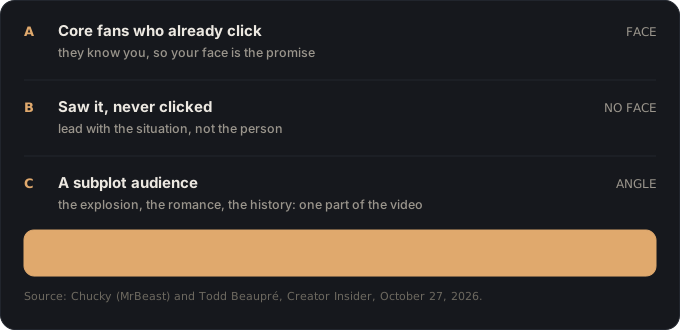
9. Jimmy’s face usually wins at launch, and sometimes loses later. In MrBeast’s tests, the thumbnail with Jimmy’s face typically wins when a video comes out. When the team retests older videos, versions without his face sometimes win. Chucky’s idea for a segment: viewers who have seen a thumbnail several times and never clicked might respond to a version without the creator’s face. Watch at 16:38.
10. Back catalog optimization will suggest new thumbnails for older videos. For channels without a design team, YouTube will point out older videos that are doing well and offer to replace or test the thumbnail. Beaupré’s longer-term aim is “set it and forget it”: upload several options and let the system find the audience for each. Watch at 18:28.
Experimenting, custom feeds and new channels
11. The algorithm does not decide whether your video is good. Chucky’s view is that the system only finds who a video is right for, and if those viewers do not click, that is not a punishment. MrBeast has had videos that did worse than expected. His advice: change one variable, ask why it worked or didn’t, read your comments (he runs a sentiment report on MrBeast’s), and swap notes with a small group of other creators. Watch at 24:26.
12. Viewers can now build custom feeds by describing what they want. Ritchie said viewers can create up to three custom feeds, possibly more with Premium. Beaupré said they are language-based: a viewer types or says what they want in their own words, and the matching is not strict keyword search, which makes it easier to surface less popular videos. New channels also get exploration slots: every so often, a viewer is shown a video the system knows little about, and if they like it, similar viewers see it too. Watch at 33:01.
The line Chucky kept coming back to: get someone to click, get them to watch to the end, and make sure they are satisfied enough to come back. Here is what that looks like as work you can do this week.
Six packaging moves for dynamic thumbnails and video A/B
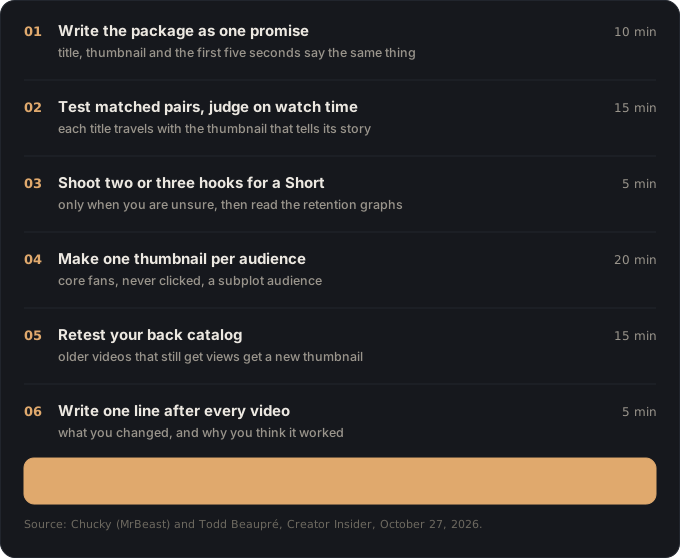
One example runs through every step. Maya runs a sourdough baking channel with about 15,000 subscribers. She posts one long video a week and a few Shorts between them. Her next video: she spends 30 days reviving a 150-year-old starter that came from a gold rush bakery. Her last video had a 9% click-through rate and still got fewer views than usual. We’ll follow her through each move.
1. Write the package as one promise (10 minutes)
Do this: before you film, write three lines on one card. The title. What the thumbnail shows. What the viewer sees and hears in the first five seconds. Then read them together and ask: do all three promise the same thing? If the thumbnail shows the result and the intro opens on something else, rewrite the intro.
You end up with: a three-line package card for the video, with the first five seconds planned before the camera is on.
Why: Chucky said autoplay on the home feed made the intro part of the package, because the thumbnail disappears as soon as the video starts. And delivering the promise in minute two instead of the first seconds costs you viewers. Our lesson on the hook that keeps the title’s promise goes further.
Maya: her card reads: title “I revived a 150-year-old sourdough starter”, thumbnail the jar with the date scratched on the lid, first five seconds her opening the jar. Her last video opened with a minute of kitchen chat before the bread appeared, which explains a high click-through rate with weak views. This time the jar opens in second one.
2. Test matched title and thumbnail pairs, and judge on watch time (15 minutes)
Do this: in YouTube Studio, open Test & Compare on the video. Build two or three pairs, where each title goes with the thumbnail that tells the same story. Don’t pair a title about one angle with a thumbnail about another. Next to each pair, write one sentence about what it bets on. When the result comes in, read it for watch time, not click-through rate.
You end up with: a running test with two or three matched pairs, and a note on what each one was betting on, so the result teaches you something for the next video.
Why: Chucky said a title and thumbnail that match each other do better than mixed ones. Ritchie said optimizing for the click alone picks the version that fails to deliver. Our lessons on why titles and thumbnails are one unit and testing your thumbnail show how to read the result.
Maya: pair A bets on the age: “I revived a 150-year-old sourdough starter” with the dated jar. Pair B bets on the result: “Bread from a gold rush starter (30 days)” with the finished loaf cut open. She does not test the age title with the loaf thumbnail, because they tell two different stories.
3. When you’re unsure how a Short should open, shoot two or three hooks (5 extra minutes)
Do this: only when you are unsure which opening is better, film the first few seconds of a Short two or three different ways while you are already set up. Change one thing between them: the opening line, a produced intro against straight to camera, or the length. Upload them as a video A/B test when it is available on your channel, and compare the retention graphs.
You end up with: one retention graph per version, a winner, and one line on what the winner did differently.
Why: this was Chucky’s “very basic level” of video A/B testing: a few seconds of extra filming, and you find out which hook people watch longer. He was just as clear that you don’t need to do this on every video. Our hook examples give you starting lines to test.
Maya: for her Short “Why your sourdough comes out flat”, she films three openings: the flat loaf next to a tall one, the line “you’re feeding your starter at the wrong time”, and her poking the dough. Three versions, about five extra minutes.
4. Make one thumbnail per audience, not one for everyone (20 minutes)
Do this: list the two or three groups who might want this video. Start with Chucky’s split: core fans who already click on your videos, and people who have seen your thumbnails and never clicked. Then look for a subplot audience: a part of the video that might pull in people who would never pick a video like yours. Make one thumbnail for each group, and label the file with who it is for.
You end up with: two or three thumbnails, each made for a named audience, rather than one compromise. If dynamic thumbnails are on your channel, upload them there. If not yet, they still work as a regular test, and you are ready when the feature arrives.
Why: Beaupré said dynamic thumbnails move away from “winner take all”, where one thumbnail has to be the lowest common denominator. Ritchie’s example was a dating subplot in a MrBeast video: a romance-heavy thumbnail could reach people who love dating content and never thought of watching MrBeast. For your core fans, our lesson on faces in thumbnails still applies.
Maya: thumbnail A for core fans: her face next to the jar. Thumbnail B for people who never click: no face, just the cracked old jar and a modern loaf. Thumbnail C for history lovers: an old photo of the bakery next to the jar. Subscribers know her, and the history angle could reach people who don’t bake at all.
5. Retest the thumbnails on your back catalog (15 minutes a month)
Do this: once a month, open YouTube Studio, go to Analytics and sort your content by views over the last 28 days. Take the top three videos that are more than three months old. Give each one a new thumbnail made for viewers who have never seen your channel, and test it against the current one. If Studio suggests a video through back catalog optimization, start with that one.
You end up with: three tests running on old videos that already get traffic, and a monthly reminder to do it again.
Why: Chucky said the thumbnail that wins at launch is not always the one that wins later: in MrBeast’s back catalog, versions without Jimmy’s face sometimes take over. Older videos mostly reach new viewers, not the fans who came on day one. Our lesson on doubling down on outliers shows how to spot which older videos to pick.
Maya: her top old video is “My first sourdough loaf (it was terrible)”, still getting views two years in. Its thumbnail is her laughing at the loaf. She tests a version with only the flat loaf and the text “Mistake #1”.
6. After every video, write one line about what you changed (5 minutes)
Do this: keep one note for your channel. After each video has run for a week, add one line: what you changed compared with the last video, what happened, and why you think it happened. Read the comments before you write it, and take one sentence from them.
You end up with: a growing list of changes and results that shows you patterns after ten videos, rather than one video’s numbers.
Why: Chucky’s advice was to change one variable, then ask yourself why it worked or didn’t. Ritchie kept a journal of what he could do better after every video. Our post-mortem lesson turns that line into a short routine.
Maya: “Starter video: jar opens in second one instead of a minute of kitchen chat. Retention at 30 seconds went from 58% to 71%. Comments asked where the starter came from, so the history angle is worth its own video.”
Where Vanpelt Studio fits (if you want help)
Everything above works with YouTube Studio and a notebook. If you’d like help with the slow parts, the Vanpelt Studio desktop app covers a few of them:
- Move 1: before you edit, it checks your footage against your plan. List the shots the package promises, shoot them, and see what’s missing while a reshoot is still easy. That includes the first five seconds.
- Move 2: it pressure-tests your title and thumbnail before you publish, so the pairs you put into Test & Compare are already worth testing.
- Move 6: import the retention CSV from YouTube Studio and it names the moment viewers left and what was on screen at that moment, which is the second half of your one line.
It doesn’t connect to your YouTube account and it doesn’t predict views.
If it went wrong, it’s one of these
When the test result looks wrong
- “My click-through rate is high but the video gets few views.” The intro probably does not keep the thumbnail’s promise. Go back to move 1 and check what happens in the first five seconds. On the homepage, many viewers never see the thumbnail at all, because the video autoplays.
- “The test winner has a lower click-through rate than the loser.” That is the system working as designed. YouTube reports watch time because the clickier version brought viewers who left. Keep the winner.
- “My test came back with no clear winner.” The versions were probably too similar for viewers to care, or the video did not get enough impressions. Test a bigger difference next time, such as a different angle on the story rather than a different colour.
When the features aren’t there yet
- “I can’t find video A/B testing or dynamic thumbnails in Studio.” Both were announced at Made on YouTube, and Beaupré described dynamic thumbnails as still being developed. YouTube gave no date for every channel. Make the extra hooks and thumbnails anyway, because they work as a regular title and thumbnail test today.
- “I’m worried a losing version will hurt my channel.” Beaupré said there is some risk in testing, and that dynamic thumbnails are designed to move impressions away from a losing version faster than an even split does. A video that does worse with one audience is not a penalty on the channel.
- “This is too much work for a small channel.” Chucky’s own answer was that you don’t have to do any of it. Do move 1 and move 6 on every video. Do the rest only when you are genuinely unsure which version is better.
The whole recipe on one line
One promise across title, thumbnail and intro → test matched pairs on watch time → shoot extra hooks when unsure → one thumbnail per audience → retest the back catalog → one line after every video. Or in Chucky’s words: get someone to click, get them to watch to the end, and make sure they’re satisfied.
Sources
- Creator Insider (YouTube), Chucky (MrBeast) on Dynamic Thumbnails, Video A/B, and the YouTube Algorithm, published October 27, 2026. Conversation between Chucky (head of virality, MrBeast), Todd Beaupré (senior director of discovery and growth, YouTube) and Rene Ritchie (creator liaison, YouTube).
- Creator Insider (YouTube), Paddy Galloway Dives Deep on Video A/B & Ask Studio, published September 30, 2026: the tools as announced at Made on YouTube.
- For the wider picture of how recommendations work, see our write-up of Beaupré’s September conversation on the YouTube algorithm.