Docs Organize
Files an editor can actually read
Camera filenames are meaningless to everyone including you. This renames the copies the app owns, so what lands in the timeline says what it is.
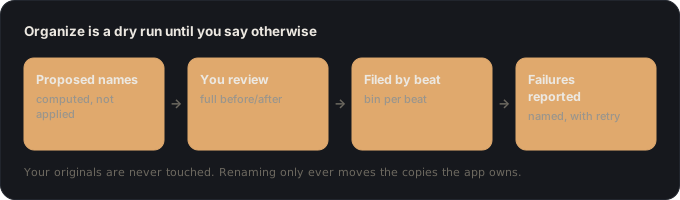
The problem it solves
Handing over a folder of camera-numbered clips moves the sorting problem to whoever opens it. That is an hour of someone else's life, repeated every project.
What it needs first
- Ingested footage, and a spine if you want bin-per-beat grouping rather than a flat rename.
How it works
- 1 It works on the owned copyThe app renames the copy in its own workspace. Your originals keep their names and their place.
- 2 Names come from the storyFiles are named for the beat and shot they serve, so the folder is organised by the video rather than by the camera.
- 3 Failures are reported per fileAnything that could not be renamed comes back with a reason and a retry for just those files, rather than a count and a shrug.
What you get back
- A proposed rename per clip
- Computed, shown, and not executed. Dry run is the default: you see the full before-and-after list before anything touches the disk.
- Bin-per-beat folders
- The workspace is grouped by beat, so the folder structure itself carries the story order into your editor.
- A per-item failure report
- If a file cannot be moved, it comes back named with one of five specific reasons: the source is missing, permission was denied, the disk is full, the file is open in another program, or the write itself failed. Plus a retry that re-attempts only the failures.
What it will not do
- Your originals are never touched. Renaming operates only on the copies the app owns.
- It never assembles or trims a timeline. Markers and suggestions only.
- It will not silently overwrite. Name collisions are disambiguated rather than resolved by clobbering.
What it buys you
- Originals are never touched, which is the anxiety that stops most people organising at all.
- The naming reflects the story, so the folder is already a map of the edit.
- Partial failure is visible and recoverable.
Under the hood
The copy-on-import model is what makes this safe. Because the app owns a copy, renaming is reversible and never risks the only version of anything. On the same volume the copy is a clone rather than duplicated bytes, so owning a copy is cheap. The name itself is a four-part pattern, project, beat number, camera, sequence, so a file sorts into story order by filename alone, and every clip that serves no beat lands in an "unused" tree grouped by theme instead of being left loose.
Questions
Will this rename my originals?
No. Originals are never modified. If you imported in move mode there is no separate archive, and the app warns loudly about that when you choose it.
Can I undo a rename?
The originals are untouched, so the worst case is renaming the owned copies again.
Does my editor need the app?
No. They get files and a handoff, not a dependency.
Organize is one lens of Vanpelt Studio.